Overview
This is a TikTok Live interactive game designed to boost viewer engagement, increase likes, and encourage gift contributions in real time.
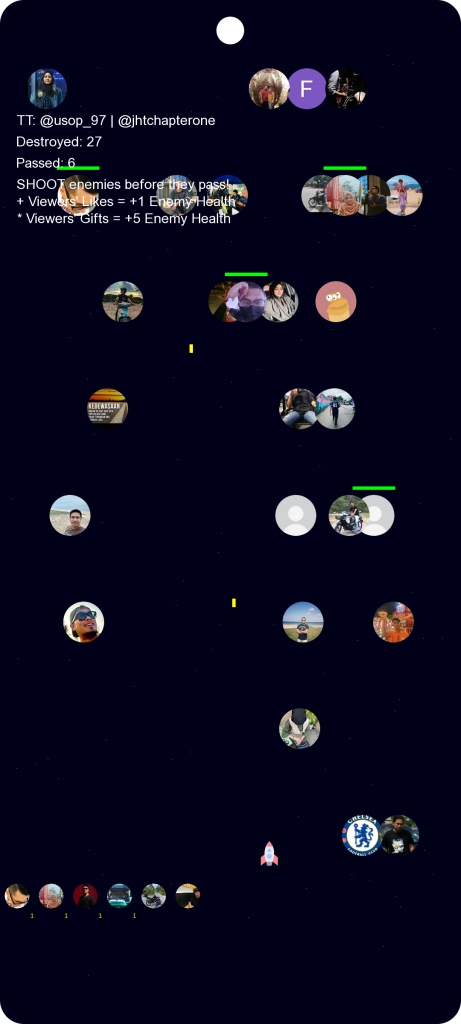
The game transforms a TikTok Live session into a classic arcade-style space shooter, where the host becomes the spaceship, and viewers become enemies falling from the top of the screen.
Built for Android, the game is controlled through simple screen touch, making it fast, responsive, and streamer-friendly.
Core Gameplay Concept
-
The TikTok Live host controls a spaceship that moves left and right.
-
Enemies fall from above, representing live viewers.
-
The spaceship automatically shoots enemies as they descend.
-
If enemies reach the bottom, they are marked as having passed the host.
Viewer Interaction Mechanics
Viewers Become Enemies
Each live viewer appears in the game as an enemy avatar, creating a fun and personal interactive experience.
Likes & Gifts Power Up Viewers
Viewers can boost their own enemy health by:
-
Sending Likes → +1 Enemy Health
-
Sending Gifts → +5 Enemy Health
This creates a competitive and playful challenge between the host and viewers.
Engagement & Reward System
-
Viewers who survive and pass the spaceship are listed below the screen.
-
The host can reward or acknowledge these viewers later during the live session.
-
This encourages:
-
More likes
-
More gifts
-
Longer watch time
-
Repeat viewer participation
-
Smart Start System (Solves Zero-Viewer Problem)
To prevent an empty game when a live session starts:
-
The system supports two TikTok IDs:
-
The host’s live account
-
A secondary TikTok live account (e.g., a friend or another live stream)
-
This ensures there are initial enemies available, keeping the game active even before real viewers join.
Key Features
-
🎮 Classic space shooter arcade gameplay
-
📱 Android-based, touch-controlled
-
🚀 Host becomes the playable spaceship
-
👥 Viewers become live enemies
-
❤️ Likes increase enemy health
-
🎁 Gifts give enemies major power boosts
-
🏆 Surviving viewers tracked for rewards & shoutouts
-
🔄 Dual-TikTok-ID mode to ensure instant gameplay
-
🔥 Designed to maximize TikTok Live engagement
How to broadcast ?
- Board cast live game from your Tiktok.
- Start the game
- Settings > Set your Tiktok username.
- Start. That’s it.
(Update 7 Feb 2026)